

Stock media
Connect stock media providers with your own API keys.
Stock media lets users search photos, videos, music, and stickers from outside services inside the editor. You connect each service with your own account, in one of three ways:
| Way | What you pass | Where your key is |
|---|---|---|
| API key | apiKey | In the page. Anyone who opens the page can read it. |
| Proxy | endpointUrl | On your server. The editor sends its requests to your server, and your server adds the key. |
| Function | searchFn or requestFn | Wherever your function sends the request. |
Use exactly one of the three for each service. Use a proxy or a function in production.
A searchFn receives the search (query, page, perPage, and more) and answers with { results, total, total_pages }. Each result is a StockPhoto for photos and StockVideo for videos, both exported types. A StockPhoto has id and url, and can have thumbnailUrl, width, height, alt, attribution, and downloadTrackingUrl. A StockVideo has id and url, and can have posterUrl, durationSeconds, width, height, and attribution. The answer of Pexels or Unsplash, unchanged, is also accepted. The editor checks every page of results: an item without an id or a url is left out, with one console line, and an answer with no list of results is shown to the user as an error of that service.
A setting that names none, or more than one, of apiKey, endpointUrl, and searchFn turns off only that service. Its panel says, for example, "Unsplash photos are not available.", and the console says which setting is wrong.
An apiKey is visible to anyone who opens your page. Use it only while you develop.
Pexels
Pexels gives the editor stock photos and stock videos:
stockMediaApis={{ pexels: { apiKey: 'YOUR_PEXELS_KEY' } }}With endpointUrl, the editor sends POST requests to your address, with the paths of the Pexels API without /v1: /search and /curated for photos, /videos/search and /videos/popular for videos. The query string and a JSON body carry query, page, and perPage. Your server adds the key, calls Pexels, and returns the answer of Pexels unchanged.
stockMediaApis={{ pexels: { endpointUrl: 'https://api.example.com/stock/pexels' } }}Default: off.
Unsplash
Unsplash gives the editor stock photos. Unsplash requires that the photographer's name is shown, so showAttribution must be true:
stockMediaApis={{
  unsplash: { apiKey: 'YOUR_UNSPLASH_ACCESS_KEY', showAttribution: true },
}}
When the user adds an Unsplash photo, the editor reports the download to Unsplash, as the Unsplash rules require. trackDownloads: false turns this off.
With endpointUrl, the editor sends POST {endpointUrl}/search with the JSON body { query, page, perPage, orientation }. Return the answer of the Unsplash search endpoint unchanged.
With endpointUrl, the editor reports a download through your server. It sends POST {endpointUrl}/download, with your headers and the JSON body { "downloadLocation": "<the photo's links.download_location>" }. Your server adds your access key and calls that address. Check that the address is on api.unsplash.com before you call it. No request in proxy mode carries your key. With searchFn, the editor has no route for the report, so it sends nothing and prints one console line.
Default: off.
Freesound
Freesound gives the editor music and sound under Creative Commons licenses. Pass it as music:
stockMediaApis={{ music: { apiKey: 'YOUR_FREESOUND_KEY' } }}With endpointUrl, the editor sends POST {endpointUrl}/search with the JSON body { query, page, perPage, source, mediaType }, and downloads a track with GET {endpointUrl}/download/freesound/{id}. Your search answer is { tracks, total, total_pages, page }:
{
  "tracks": [
    {
      "id": 701,
      "title": "Calm piano",
      "artist": "composer1",
      "duration": 42,
      "previewUrl": "https://cdn.example.com/previews/701.mp3",
      "downloadUrl": "https://cdn.example.com/sounds/701.mp3",
      "license": "CC0",
      "source": "freesound"
    }
  ],
  "total": 1,
  "total_pages": 1,
  "page": 1
}
license is CC0, CC-BY, or CC-BY-SA. A track that is not CC0 needs attribution, and the editor keeps the artist's name with the clip.
Default: off.
GIPHY
GIPHY gives the editor stickers and animated stickers. It is a sticker source, so you pass it in stickers, with giphyStickers:
import { VideoEditor, giphyStickers } from '@layermetry/media-editor/react';

<VideoEditor
  licenseKey="YOUR_LICENSE_KEY"
  onClose={handleClose}
  stickers={{ sources: [giphyStickers({ apiKey: 'YOUR_GIPHY_KEY' })] }}
/>
The Stickers panel shows the words "Powered by GIPHY" while GIPHY stickers are browsed, as GIPHY's terms ask. The mark is in the panel only, never on the canvas or in an export.
With endpointUrl, the editor sends GET {endpointUrl}/search?q=… or GET {endpointUrl}/trending, with type=stickers, rating=pg, limit, and offset. Your server adds api_key, calls GIPHY, and returns the answer of GIPHY unchanged. requestFn receives the same request as an object.
See Stickers and GIFs for built-in and custom sticker sets.
Default: off. Without stickers, the panel shows the built-in stickers.
Photo credits
A stock photo keeps its photographer's credit after the user places it. The placed item carries attribution, which is saved with templates and drafts. Stock video clips and music tracks keep their credit too.
When the design holds a stock photo with a credit, the Export panel shows two switches:
| Switch | What it does |
|---|---|
| Show photo credits on the canvas | Draws the credits, such as "Photo by Ana on Unsplash", in a small dark box in the bottom-left corner of the canvas. |
| Include photo credits in the export | Writes the same box into the exported video. |
The user's choice is saved with the design, and it can be undone. showAttributionOverlay and includeAttributionInExport set the starting value of each switch. Both are false by default.
To show credits your own way, hide a switch. A hidden switch always follows your prop:
ui={{ exportOptions: { hidden: ['photoCreditsOverlay', 'photoCreditsInExport'] } }}stockMediaApis.pexels.showAttribution: false hides the photographer's name on the Pexels photo tiles. Unsplash tiles always show the name, because Unsplash requires it.
Where providers appear
Each service adds a Stock tab to the Media panel, or adds stickers to the Stickers panel:
| Service | Where it appears |
|---|---|
| Pexels | Media > Video > Stock Videos, and Media > Photo > Stock Images |
| Unsplash | Media > Photo > Stock Images |
| Freesound | Media > Audio > Stock Music |
| GIPHY | Stickers |
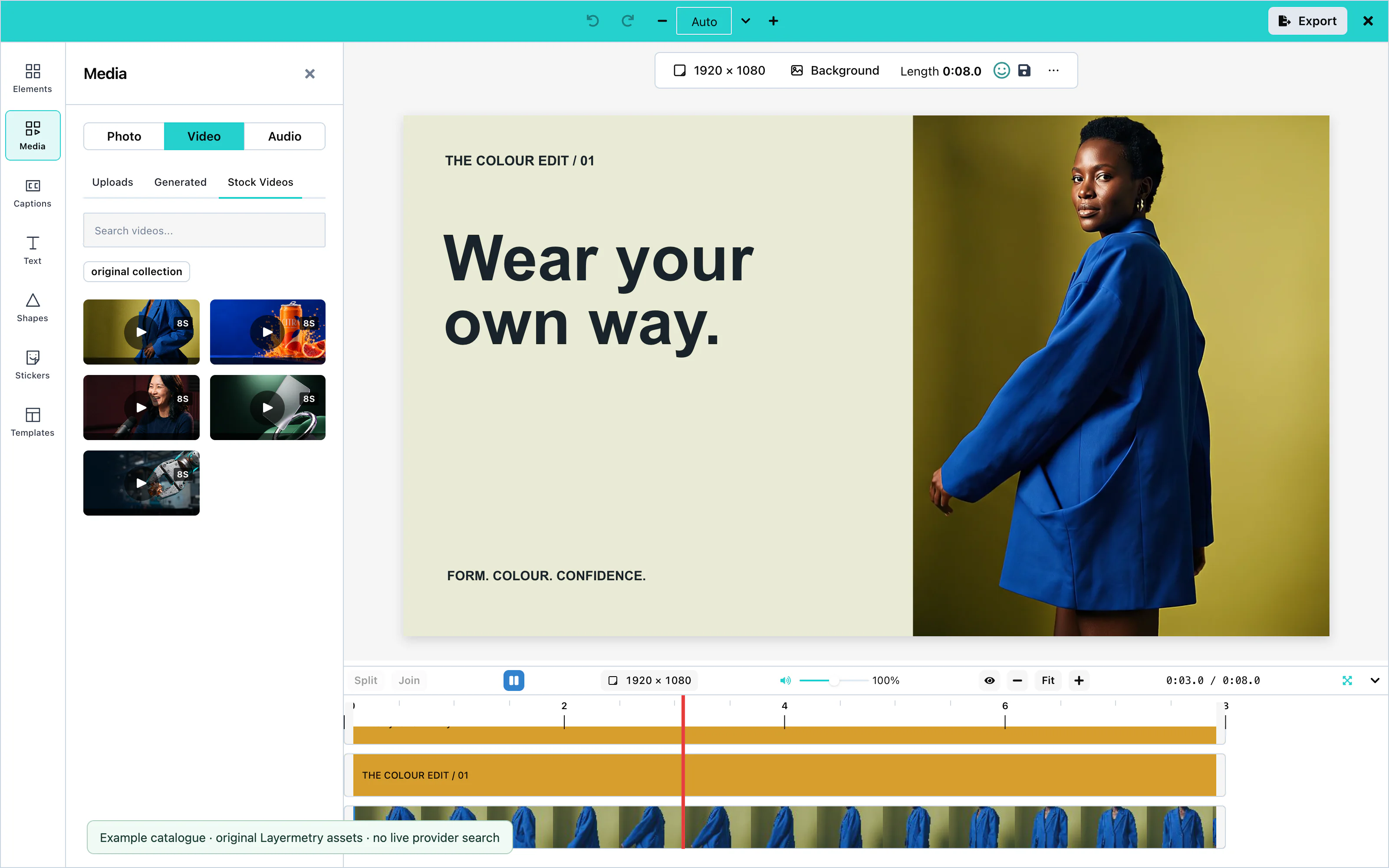 View full size
The screenshot shows pictures returned by the example host's searchFn. It is not a live search of a stock provider.
A service without configuration has no tab.