

Effects and filters
Apply visual effects to images, video, and text.
Effects change the look of video clips, pictures, and shapes: filters such as grayscale, and adjustments such as brightness. Text has its own effects: outline, shadow, and spacing.
Setup
Effects need no setup. Select a clip, a picture, or a shape, and open Effects in the tool rail, or press Effects under the selected item.
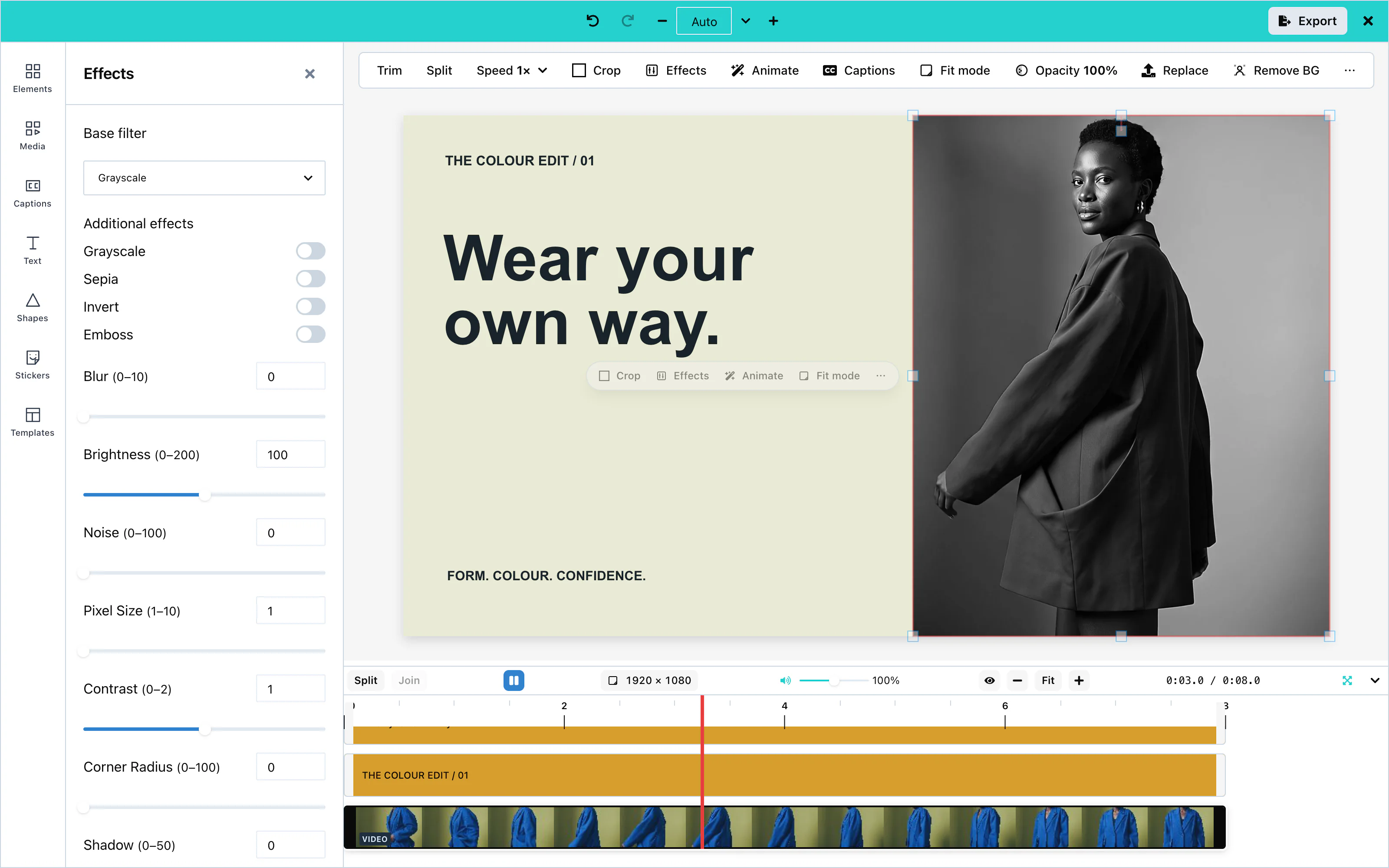 View full size
Filter presets
On a phone, expand the Effects sheet for more room. While expanded, press Collapse beside Done, or tap the grip, to return to its default height.
Base filter chooses one preset: None, Grayscale, Sepia or Invert. Additional effects switches effects on or off independently: Grayscale, Sepia and Invert, plus Emboss for pictures and shapes. These group labels are the same on desktop and phone.
Base Filter applies one filter to the whole item: None, Grayscale, Sepia, or Invert.
Filters also switch on and off one by one:
| Filter | Video clips | Pictures and shapes |
|---|---|---|
| Grayscale | Yes | Yes |
| Sepia | Yes | Yes |
| Invert | Yes | Yes |
| Emboss | No | Yes |
Adjustments
Adjustments take a number. A video clip offers the first three. Pictures and shapes offer all of them:
| Adjustment | Range | Video clips |
|---|---|---|
| Blur | 0 to 10 | Yes |
| Brightness | 0 to 200. 100 is no change. | Yes |
| Contrast | 0 to 2. 1 is no change. | Yes |
| Noise | 0 to 100 | No |
| Pixel Size | 1 to 10 | No |
| Corner Radius | 0 to 100 | No |
| Shadow | 0 to 50 | No |
| Offset X, Offset Y | −50 to 50 | No |
| Shadow Offset X, Shadow Offset Y | −50 to 50 | No |
| Opacity | 0 to 100 | No |
Export support
Every filter and adjustment that the panel offers for an item appears in the exported video, exactly as in the editor.
Text effects
Select a text item and press the text effects button (Ae). The panel then offers text presets (Neon, Outline, Drop Shadow), an outline, a shadow or glow, and letter and line spacing. See Text.
Configuration
Effects have no props. To remove the panel, hide it in the tool rail:
ui={{ toolRail: { hidden: ['effects'] } }}Events
Effects have no events of their own. They reach you inside the exported video through onExport. See Events.