

Save generated results
Store generated text and media with your application, then load results by user and brand.
GeneratedStoreOptions.With ai.generatedStore.onSave, your host receives generated results to save and supplies the records to display. Text results are sent when generated. File results are sent when generated by default, including unused suggestions; set saveFiles: 'used' to wait until a file result is placed. Records are independent of the design file.
Without this option, the list lasts for the editor session. Reloading the page loses results your host has not saved.
Data flow
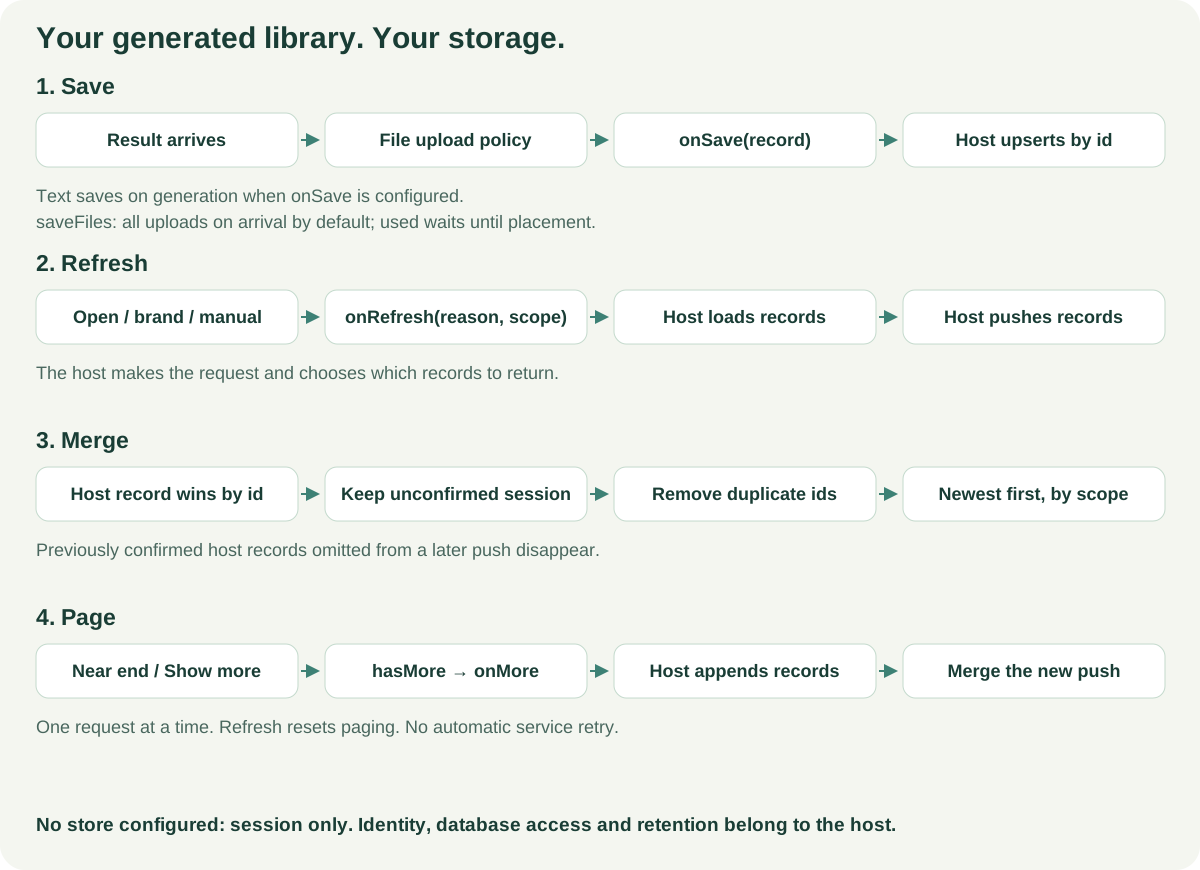
With onSave configured, text records are pushed as soon as the result arrives. File results are pushed when they arrive by default. If you also provide onUploadAsset, the editor uploads each file first and includes the returned URL in the record. Set saveFiles: 'used' to defer a file's upload and first push until it is placed. Text results are still pushed when they arrive.
For generated-file uploads, source is 'generated', and generatedId and itemId both contain the generated record id. itemId is not the id of a canvas item. templateId is generated- followed by the record id. If your upload handler sorts or groups files by templateId, account for this generated-file value.
When you provide onUploadAsset, placing a record returned by your host reuses its saved URL. The editor does not upload that file again through the callback.
If onUploadAsset is absent, the record keeps the model's URL. Provider URLs may expire, often within about an hour. Store file bytes yourself and return a long-lived URL before treating the record as durable.
Connect your host
Your screen owns the database requests and the current records. This component passes its latest data and callbacks to the editor.
import type { ComponentProps } from 'react';
import {
  VideoEditor,
  type GeneratedStoreOptions,
} from '@layermetry/media-editor/react';

type HostProps = Pick<GeneratedStoreOptions,
  'records' | 'hasMore' | 'onSave' | 'onRefresh' | 'onMore' | 'saveFiles'
> & {
  licenseKey: string;
  onUploadAsset: NonNullable<ComponentProps<typeof VideoEditor>['onUploadAsset']>;
};

export default function GeneratedEditor({
  licenseKey, records, hasMore = false,
  onSave, onRefresh, onMore, saveFiles = 'all', onUploadAsset,
}: HostProps) {
  return <VideoEditor
    licenseKey={licenseKey}
    onClose={() => console.log('Editor closed')}
    onUploadAsset={onUploadAsset}
    ai={{
      endpointUrl: '/api/ai',
      text: true,
      image: true,
      generatedStore: {
        records, hasMore, onSave, onRefresh, onMore,
        savePrompt: true,
        saveFiles,
      },
    }}
  />;
}
/api/ai is your generation endpoint. The store callbacks are separate: implement them using your own authenticated service. After loading or saving, pass a new records array to update the list. In React, use normal prop updates. Plain JavaScript hosts and custom elements use their existing options-update path, keeping the rest of ai configured.
GeneratedRecord, GeneratedScope, GeneratedStoreOptions and GeneratedRefreshReason are exported from the package root, @layermetry/media-editor/embed and @layermetry/media-editor/react.
Events and reasons
| Callback | When it runs | Host responsibility |
|---|---|---|
onSave(record) | Text is pushed when it arrives. File results are pushed when they arrive with the default saveFiles: 'all', or when placed with saveFiles: 'used'. Placement or application sends the same id with used: true; with 'used', this is the first push for a file. | Upsert by record.id. Keep the same id when usage changes. |
onRefresh({ reason: 'open', scope }) | Once when the editor opens, if this callback exists. | Load the first page for the signed-in user and current scope. |
onRefresh({ reason: 'brand', scope }) | The brand changes. | Load that brand's first page and discard older requests. |
onRefresh({ reason: 'manual', scope }) | The user presses the Generated list's refresh icon. | Load a fresh first page. |
onMore({ scope, afterId }) | The user scrolls near the end or presses Show more, with hasMore: true. | Load the next page, append it to your records, and update hasMore. |
onSave may return a promise, but the editor does not wait for it or retry it. A throw or rejection produces a console warning; the result stays in the session. Handle save failures and any retry policy in your host.
onRefresh and onMore are notifications, not record-returning functions. Push the result back through records. Your host may push records at any time, including after a change from another tab or device.
The refresh reason type is GeneratedRefreshReason, with the values 'open', 'brand' and 'manual'. At startup, the host can receive 'open' followed by 'brand' if the active brand arrives after the first scope report.
Merge rules
Each push is your current list, including any pages you want to keep loaded. The editor merges it with session results by id:
- Your record wins when an id exists in both lists. The session copy is removed.
- Session results absent from your push stay visible: your response may have started before those results were generated.
- A previously supplied host record disappears if your next push omits it. Keep earlier pages in your array when appending a page.
- An id appears once. Results from both sources are sorted newest first by
createdAt.
Scope and brand switching
scope carries the string values from templateMetadata.metadata and the current brand id. Only userId and brandId decide which records are shown. For each key, the stored and current values must match; the key also matches when it is absent on both sides. Other scope keys are carried and saved, but are not compared. Do not use extra scope keys for tenant or user isolation.
A brand change hides records outside the new user and brand match immediately, then requests a refresh when onRefresh exists. Check the signed-in user and access to the brand on the server; client-supplied scope is not authorization.
Loading and paging
The refresh icon appears only when onRefresh exists. Refresh returns the list to the top, resets paging, and clears a pending more state. Send a first-page array and its new hasMore value.
With hasMore: true, reaching the end fires one onMore event. Scrolling does not request another page until records grows or refresh resets the state. A person can retry with Show more after an error.
Loading displays Loading more…. After 10 seconds without more records, it becomes Couldn't load more. Try again. If a records push increases the list after this message, the message clears. Refresh also waits for the next records push; after 10 seconds without one, it shows Couldn't refresh. Try again. These states do not retry your service automatically.
The list renders visible entries, groups results by run, and shows the result type. The Text panel’s Generated section shows only generated words and rewrites. AI-made text templates use the textTemplate record type and appear first in the Styles gallery with an AI badge. Elements shows the other generated types. Both use the same records. The empty message is No generated results yet, with for this brand when a brand is selected.
Record format
| Field | Meaning |
|---|---|
version | 1, the record-format version. |
id | A random id created once for this result. Use it as the upsert key. |
scope | Carries user, brand and other string values. Only userId and brandId determine which records are shown. |
type | The operation that made the result, such as text, textRewrite, textTemplate, image or imageEdit. Accept future string values. |
createdAt | An ISO timestamp used for newest-first ordering. |
prompt | The prompt, omitted with savePrompt: false. |
settings | Optional generation settings. |
model | Optional catalogId, modelId and providerId. |
result | { text }, { template: AITextTemplate } for textTemplate, or { url, mimeType?, width?, height?, durationMs? }. Media duration is in milliseconds when present. |
used | Initially false; becomes true when placed or applied. |
Text record
{
  "version": 1,
  "id": "bf01bfd0-0957-4ef4-b0d5-edb3eec055ad",
  "scope": { "userId": "user-42", "brandId": "brand-summer" },
  "type": "text",
  "createdAt": "2026-10-15T12:00:00.000Z",
  "prompt": "Write a short summer-sale heading",
  "settings": { "temperature": 0.4 },
  "model": { "catalogId": "headlines", "modelId": "your-text-model" },
  "result": { "text": "Summer starts here" },
  "used": false
}
When this suggestion is added, upsert the same id with used: true. Do not create a second record for the usage update.
Text-template record
{
  "version": 1,
  "id": "9fb1b0dd-7c03-4ef6-9e04-020a3653e140",
  "scope": { "userId": "user-42", "brandId": "brand-summer" },
  "type": "textTemplate",
  "createdAt": "2026-10-16T12:00:00.000Z",
  "prompt": "A red summer-sale heading",
  "result": {
    "template": {
      "name": "Summer sale",
      "category": "sale",
      "w": 300,
      "h": 100,
      "layers": [{ "text": "SALE", "x": 0, "y": 0, "width": 300, "fontFamily": "Anton", "fontSize": 80 }]
    }
  },
  "used": false
}
The template value uses the neutral text-template format. Upsert by the same record id when the template is applied and used changes to true.
Picture record
{
  "version": 1,
  "id": "ec2a55fb-dab9-4023-a990-c9531a78b205",
  "scope": { "userId": "user-42", "brandId": "brand-summer" },
  "type": "image",
  "createdAt": "2026-10-15T12:01:00.000Z",
  "prompt": "A blue picnic blanket on a sunny lawn",
  "settings": { "size": "1024x1024" },
  "result": {
    "url": "https://cdn.example.com/generated/picnic.png",
    "mimeType": "image/png",
    "width": 1024,
    "height": 1024
  },
  "used": false
}
This URL represents your stored file, not the provider's temporary download address.
Defaults
| Setting | Default behavior |
|---|---|
No generatedStore | Session-only results; no refresh icon, paging UI or Not saved yet hint. |
onSave only | Push results to the host; display the session list plus any supplied records. |
records without onRefresh | Follow host pushes; show no refresh icon. |
hasMore omitted | false; no paging UI. |
savePrompt omitted | true; include the prompt. |
saveFiles: 'all' (default) | With onSave, push file results when they arrive. If onUploadAsset is set, upload each file before pushing its record. Text results are pushed when they arrive. |
saveFiles: 'used' | With onSave, defer a file result's upload and first push until the user places it. Text results are still pushed when they arrive. |
With onSave configured, a session result still absent after the next host push shows Not saved yet. It stays available in the current session, but the editor cannot restore it after a reload unless your host saved it. A file result configured with saveFiles: 'used' is not pushed until it is placed.
If ai.generatedStore has an invalid shape, the editor logs a validation warning beginning [MediaEditor] ai.generatedStore: and ending The store is ignored; AI stays on. The store is ignored; AI generation remains enabled.
Host checklist
- Upsert by id. A new result and its usage update share an id. Make retries in your service idempotent too.
- Ignore older responses. Use request ids or cancellation in your host. Do not let an old request replace newer records or another brand's data.
- Keep file URLs usable. Store generated file bytes and return long-lived URLs. Provider addresses may expire; consider access rules when choosing your storage URLs.
- Authorize on the server. Read the signed-in user from your server session and check their brand access. Do not trust a browser's
scopeas proof of identity. - Budget for unused results. Suggestions can be saved even when never placed. Set retention limits in your service. Use
savePrompt: falsewhen prompts should not be stored in records. - Handle brand changes. Clear stale host data and load the new scope. Support updates from other tabs or devices through your own subscription or refresh flow.
- Include usable brand data. A listed kit with only an id and name is dropped. Add a logo, a primary or secondary color, a text style, or writing data. Writing data alone can inform generation but does not create a Brand panel entry. If you want a Brand panel entry, include a logo, a primary or secondary color, or a text style.
- Reset paging on refresh. Replace the old pages with the new first page and update
hasMore. Ignore an older pending page response. - Confirm saves through records. Returning from
onSavedoes not supply the list. Push saved records back; results never saved by your host are lost on reload.
Agent access to saved results and draft restoration are outside this integration. See AI providers and Asset storage for generation and file-upload setup.